
Copyright 4POS Software since 2005
4POSEVO is 4POS without the brick & mortar
...

Learn
Links
4POS 4 Retail
4POS 4 Hospitality
4POS Features
4POS Credit card Interface
4POS Airtime Sales
4POS Loyalty
4POS Time in Attendance
4POS Enterprise
4LIQUOR
4MEAT Block Test
4POS Stock Take App
4POS Touch App












4POSEVO – The Next Evolution of 4POS
Over the years, 4POS has evolved many times. From its early days on Windows XP, through Windows 7, 10, and now Windows 11, the system has grown into a powerful and
trusted platform used by thousands of businesses.
4POSEVOlution, or 4POSEVO, represents the most significant evolution yet.
The Problem We Had to Solve
4POS has always been a desktop-based system. While reliable, this created a growing limitation:
You can only access your system from specific computers
You need remote software like TeamViewer or AnyDesk to work from home
The office computer must be on
It’s inconvenient, slow, and not practical
Many customers want to:
Change prices from home
Check stock on a weekend
Analyse sales while travelling
Manage multiple branches remotely
Desktop software simply wasn’t designed for that.
Why We Didn’t “Just Put It in the Cloud”
Over the years, we explored many options. The conclusion was clear:
You cannot take an existing desktop system and simply “move it to the cloud” without major performance and usability problems.
4POS is built in VB.NET and SQL. Running it directly in the cloud would be:
Slow
Restrictive
Still tied to specific machines
The only real solution was a rewrite.
What We Are Actually Doing
This is important:
We are NOT redesigning 4POS.We are NOT starting from scratch.
4POSEVO is the same 4POS you already know, rebuilt using modern cloud technologies.
Backend: Existing 4POSEVO logic rewritten as secure APIs
Frontend: Built in Flutter, allowing one system to run on:
Windows
Android
iOS
Any modern web browser
This means:
One codebase
One database
One experience
Available everywhere
What “Cloud-Based” Really Means
Your data will be stored on secure, professional cloud servers (not in your office or your pc).
These servers provide:
Automatic backups
High-level security
Redundancy
Continuous availability
No need for local server maintenance
Although many companies are hosted on the same infrastructure, each business’s data is completely isolated and secure.
You will only ever see your data.
What This Means for You
With 4POSEVO, you can:
Access your system from any device
Change prices and see them live within seconds
Check stock levels, values, minimums, and maximums
View debtors, creditors, and profit analysis
Drill into reports instead of just receiving summaries
Manage security permissions remotely
Run multiple branches on one database
Work from anywhere, anytime
No more:
Waiting until Monday
Calling staff for reports
Hoping backups worked
Losing data due to hardware failure
A Real Business Advantage
Small changes can have big results.
One price increase of R1 on a high-volume item can mean tens of thousands of rand extra per month—but only if you can react quickly and confidently.
4POSEVO puts that power in your hands.
Pricing Philosophy
Development is already funded through our existing customer base.You are not paying for development.
You are paying for:
Server infrastructure
Backups
Security
Availability
Ongoing cloud services
Timeline
We are ready & onboarding customers
For now:
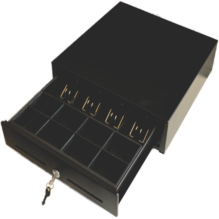
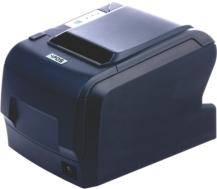
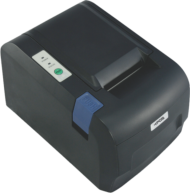
4POS Scan and 4POS Touch remain local (for speed, scanners, drawers, printers)
4POSEVO desktop continues as normal
4POSEVO is an additional option, not a forced change



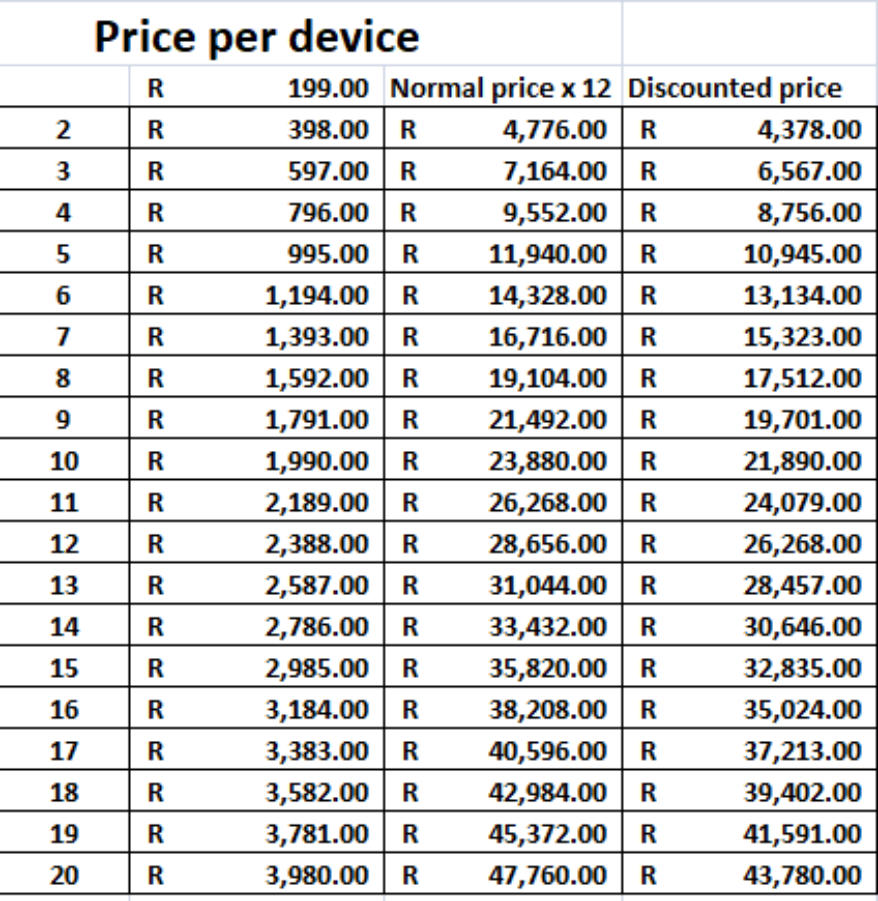
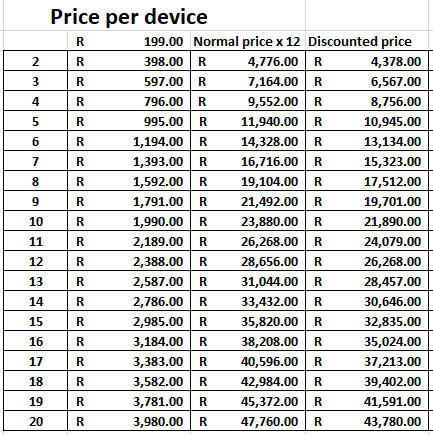
4POSEVO Pricing Structure explained
4POSEVO cloud Backoffice is taken as 1 “device” although you can use it on multiple pc’s / Browsers
Each POS that you have is then also added as a “Device”
Assume the following : You need a Backoffice & 1 POS to sell on - that will be 2 devices.
If you need 3 Backoffice users & 1 POS to sell on - still adds as 2 devices…
You have 5 users that require Backoffice functionality & 6 POS machines = 7 devices.
11 POS machines - = 11 + 1 = 12 devices
All pricing is per year. Devices x 12 months BUT we only charge for 11 months…
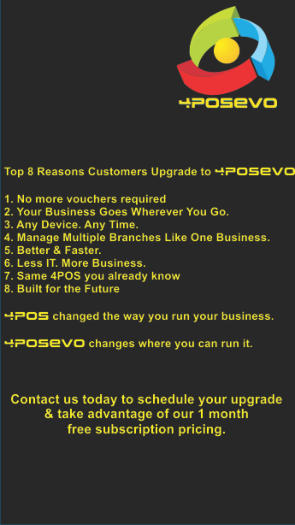
With 4POSEVO - NO MORE costs per voucher!
FAQ's :
Q1. Does 4POSEVO get installed on a pc also or is it only configured on the cloud.
Answer : Both. We will configure your cloud database & access & also assist with each of your POS PC installations.
Q2. Do I still need to purchase a 4POS licence first before I subscribe to 4POSEVO?
Answer : No, no vouchers required anymore with 4POSEVO
Q3. If I have already purchased 4POS vouchers - what happens to the vouchers?
Answer : They will be disabled & not used anymore
Q4. If I currently have one POS machine, do I need to subscribe for one 4POSEVO device only?
Answer : No, One device will be for your POS pc & one device for your cloud connection.
Q5. How many users can use my cloud access?
Answer : We allow five users for one device - if you require more users, they will be counted in multiples of 5 for additional
subscriptions.
Q6. How many POS machines can I use?
Answer : One POS machine per subscription, but no limit on the number of POS subscriptions. We have customers with 20
branches & all 20 will be handled into the same database.
Q7. How will I manage each POS then in terms of cashups etc.
Answer : Each POS will still be defined separately, assigned a POS number, a warehouse to update stock to & if separate
branches, you can add a LOGO per branch to identify the branch eg. Jorrisen Street.
Q8. What about upgrades from 4POS?
Answer : Your 4POSEVO on the cloud will be updated automatically & the POS pc's will also update as soon as there are
changes done.
Q9. And backups?
Answer : Your server will automatically be backed up by our services & our server is backup daily as an additional layer. We
also run the best Anti-virus protection.
Q10. Can you only access Backoffice when using 4POSEVO on a tablet.
Answer : No, ANY browser. Meaning a pc, Apple, Tablet or your phone. (We had a customer that did his dayends on his
phone from home...)
Q11. Can you do sales using a tablet when using 4POSEVO.
Answer : With our 4POS apps, you can. Just remember that you would need a Bluetooth printer & scanner then.
Q12. When I subscribe for 2 devices - Backoffice and 1 POS to sell - When the yearly subscription expires - do I have to
subscibe for 2 devices again.
Answer : Yes. Remember you are also paying for our server space, backups, anti-virus which are included.
Q13. How to setup another terminal in evo, Is it same as 4POS networking?
Answer : No. Effectively no networking required any more. As long as the PC has Internet access, you can add a subscription
for the new terminal & start selling once we have configured it.
Q14. Does 4POS terminals also requires internet for sale, or can we do sales offline and sync later?
Answer : Yes. Effectively all POS machines are permanently offline & once a sale is completed the 4POSEVOController will
update that to your cloud database.
Q15. And how long will this take?
Answer : Typically a few seconds...
Q16. And if I do price changes - how long does that take to be updated?
Answer : Less than a minute. We tested it & soon as you have done an Update POS, the controller on the pc will pick it up in
less than 5 seconds & start updating...
Q17. How can existing 4pos customer migrate to 4posevo with their old backups.
Answer : We will assist with that.
Q18. Will it always be one username and password. Which can be used by those who know it?
Answer : No. Unlimited passwords with security permissions for whichever function each user requires or what you wish to
allow for.
4POSEVO for Multiple Branches
1. Create multiple warehouses to manage stock per branch (Even if you have 2 or more POS machines per warehouse)
2. 4POSEVO caters for re-order levels per warehouse
3. Orders & Purchase orders will be created per warehouse
4. Minimum reorder Matrix will be based on sales per warehouse, Reorder level of warehouse & Stock Level of warehouse
5. Use sales channels to manage pricing per branch
From CP Venter :
I've been a 4POS customer for the past 13 years, and two months ago I upgraded to 4POS EVO. I can honestly say that
moving to the cloud-based system has been one of the best decisions for my business. The biggest advantage is the flexibility.
I can access my back office from anywhere, at any time, which gives me complete control over my business even when I'm
away from the store. Being able to monitor operations, make changes, and manage information remotely has made running my
business much easier. The GRV process is another feature that has really impressed me. It's much quicker, more user-
friendly, and far more efficient than before, saving valuable time every day. After using 4POS for over a decade, it's great
to see how the system continues to evolve to meet the needs of modern retailers. The transition to 4POS EVO has been
smooth, and the improvements have made a noticeable difference to our daily operations.
I would highly recommend 4POS EVO to any retailer looking for a reliable, modern, and cloud-based POS solution. The
investment in 4POS EVO has genuinely improved the way I manage my businesses.
Owner of 3 business running 4POSEVO : Liquor Store, Hardware Store, Supermarket with Take-away.
From Rudi Schekierka:
At Yummies Co we recently changed over from traditional 4POS to 4POSEVO. The transition was smooth and any issues we
had was quicly resolved by the 4POS TEAM.
The 4POSEVO system works like a dream and access to the back office from any location is a major improvement.
Thank you for the 4POS Team for a great product and awesome service.
Rudi
CFO
Yummies CO
From Factory linen shop :
A MUST, especially for multiple branches
Everything on the cloud
Work load has become much more simpler
SAME 4POS, just easier and better
Conversion (no down time)
Adjustments to the new software (simple)
Features (better )
Assistance in set up (100%)
Customer mess ups and queries (4pos whatsapp played their part 110% )
This is the New way 4posevo
Well worth it and highly recommended

Copyright 4POS 2005


Links


Retail Stores
Hospitality Stores
4POS Features
4POS Credit card Interface
4POS Airtime Sales
4POS Loyalty
4POS Time in Attendance
4POS Enterprise
4LIQUOR
4MEAT Block Test
4POS Stock Take App
4POS Touch App


4POSEVO – The Next Evolution of 4POS
Over the years, 4POS has evolved many times. From its early days on
Windows XP, through Windows 7, 10, and now Windows 11.
The system has grown into a powerful and trusted platform used by
thousands of businesses.
4POSEVOlution, or 4POSEVO, represents the most significant evolution yet.
The Problem We Had to Solve :
4POS has always been a desktop-based system. While reliable, this created
a growing limitation:
You could only access your system from specific computers
You needed remote software like TeamViewer or AnyDesk to work from home
The office computer must be switched on
It’s inconvenient, slow, and not practical
Many customers want to:
·Change prices from home
·Check stock on a weekend
·Analyse sales while travelling
·Manage multiple branches remotely
Desktop software simply wasn’t designed for that.
Why We Didn’t “Just Put It in the Cloud”
Over the years, we explored many options. The conclusion was clear:
You cannot take an existing desktop system and simply “move it to the cloud”
without major performance and usability problems.4POS is built in VB.NET
and SQL. Running it directly in the cloud would be:
·Slow
·Restrictive
·Still tied to specific machines
The only real solution was a rewrite.
What we Are Actually Doing
This is important:
We are NOT redesigning 4POS.We are NOT starting from scratch.
4POSEVO is the same 4POS you already know, rebuilt using modern cloud
technologies.
·Backend: Existing 4POSEVO logic rewritten as secure APIs
·Frontend: Built in Flutter, allowing one system to run on:
·Windows
·Android
·iOS
·Any modern web browser
This means:
·One codebase
·One database
·One experience
·Available everywhere and anytime you have internet
What “Cloud-Based” Really Means :
Your data will be stored on secure, professional cloud servers
(not in your office or your pc).
These servers provide:
·Automatic backups
·High-level security
·Redundancy
·Continuous availability
·No need for local server maintenance
Although many companies are hosted on the same infrastructure,
each business’s data is completely isolated and secure.
You will only ever see your own data.
What This Means for You. With 4POSEVO, you can:
·Access your system from any device
·Change prices and see them live within seconds
·Check stock levels, values, minimums, and maximums
·View debtors, creditors, and profit analysis
·Drill into reports instead of just receiving summaries
·Manage security permissions remotely
·Run multiple branches on one database
·Work from anywhere, anytime
No more:
·Waiting until Monday
·Calling staff for reports
·Hoping backups worked
·Losing data due to hardware failure
A Real Business Advantage
Small changes can have big results.
One price increase of R1 on a high-volume item can mean tens of thousands
of rand extra per month—but only if you can react quickly and confidently.
Pricing Philosophy
Development is already funded through our existing customer base.You are
not paying for development.
You are paying for:
·Server infrastructure
·Backups
·Security
·Availability
·Ongoing cloud services
Timeline
·We are ready!
·Selected customers are being uploaded daily
For now:
·4POS Scan and 4POS Touch remain local (for speed, scanners,
·drawers, printers)
·4POSEVO desktop continues as normal
·4POSEVO is an additional option, not a forced change
What This Means for You. With 4POSEVO, you can:
·Access your system from any device
·Change prices and see them live within seconds
·Check stock levels, values, minimums, and maximums
·View debtors, creditors, and profit analysis
·Drill into reports instead of just receiving summaries
·Manage security permissions remotely
·Run multiple branches on one database
·Work from anywhere, anytime
No more:
·Waiting until Monday
·Calling staff for reports
·Hoping backups worked
·Losing data due to hardware failure
4POSEVO puts that power in your hands.
FAQ's :
Q1. Does 4POSEVO get installed on a pc also or is it only
configured on the cloud.
Answer : Both. We will configure your cloud database & access &
also assist with each of your POS PC installations.
Q2. Do I still need to purchase a 4POS licence first before I
subscribe to 4POSEVO?
Answer : No, no vouchers required anymore with 4POSEVO
Q3. If I have already purchased 4POS vouchers - what happens to
the vouchers?
Answer : They will be disabled & not used anymore
Q4. If I currently have one POS machine, do I need to subscribe
for one 4POSEVO device only?
Answer : No, One device will be for your POS pc & one device for
your cloud connection.
Q5. How many users can use my cloud access?
Answer : We allow five users for one device - if you require more
users, they will be counted in multiples of 5 for additional
subscriptions.
Q6. How many POS machines can I use?
Answer : One POS machine per subscription, but no limit on the
number of POS subscriptions. We have customers with 20 branches
& all 20 will be handled into the same database.
Q7. How will I manage each POS then in terms of cashups etc.
Answer : Each POS will still be defined separately, assigned a POS
number, a warehouse to update stock to & if separate branches,
you can add a LOGO per branch to identify the branch eg.
Jorrisen Street.
Q8. What about upgrades from 4POS?
Answer : Your 4POSEVO on the cloud will be updated automatically
& the POS pc's will also update as soon as there are changes done.
Q9. And backups?
Answer : Your server will automatically be backed up by our
services & our server is backup daily as an additional layer. We
also run the best Anti-virus protection.
Q10. Can you only access Backoffice when using 4POSEVO on a
tablet.
Answer : No, ANY browser. Meaning a pc, Apple, Tablet or your
phone. (We had a customer that did his dayends on his phone from
home...)
Q11. Can you do sales using a tablet when using 4POSEVO.
Answer : With our 4POS apps, you can. Just remember that you
would need a Bluetooth printer & scanner then.
Q12. When I subscribe for 2 devices - Backoffice and 1 POS to
sell - When the yearly subscription expires - do I have to subscibe
for 2 devices again.
Answer : Yes. Remember you are also paying for our server space,
backups, anti-virus which are included.
Q13. How to setup another terminal in evo, Is it same as 4POS
networking?
Answer : No. Effectively no networking required any more. As long
as the PC has Internet access, you can add a subscription for the
new terminal & start selling once we have configured it.
Q14. Does 4POS terminals also requires internet for sale, or can
we do sales offline and sync later?
Answer : Yes. Effectively all POS machines are permanently offline
& once a sale is completed the 4POSEVOController will update that
to your cloud database.
Q15. And how long will this take?
Answer : Typically a few seconds...
Q16. And if I do price changes - how long does that take to be
updated?
Answer : Less than a minute. We tested it & soon as you have
done an Update POS, the controller on the pc will pick it up in less
than 5 seconds & start updating...
Q17. How can existing 4pos customer migrate to 4posevo with their
old backups.
Answer : We will assist with that.
Q18. Will it always be one username and password. Which can be
used by those who know it?
Answer : No. Unlimited passwords with security permissions for
whichever function each user requires or what you wish to allow
for.
4POSEVO for Multiple Branches
1. Create multiple warehouses to manage stock per branch (Even if
you have 2 or more POS machines per warehouse)
2. 4POSEVO caters for re-order levels per warehouse
3. Orders & Purchase orders will be created per warehouse
4. Minimum reorder Matrix will be based on sales per warehouse,
Reorder level of warehouse & Stock Level of warehouse
5. Use sales channels to manage pricing per branch
From CP Venter :
I've been a 4POS customer for the past 13 years, and two months
ago I upgraded to 4POS EVO. I can honestly say that moving to
the cloud-based system has been one of the best decisions for my
business. The biggest advantage is the flexibility. I can access my
back office from anywhere, at any time, which gives me complete
control over my business even when I'm away from the store. Being
able to monitor operations, make changes, and manage information
remotely has made running my business much easier. The GRV
process is another feature that has really impressed me. It's much
quicker, more user-friendly, and far more efficient than before,
saving valuable time every day. After using 4POS for over a
decade, it's great to see how the system continues to evolve to
meet the needs of modern retailers. The transition to 4POS EVO
has been smooth, and the improvements have made a noticeable
difference to our daily operations.
I would highly recommend 4POS EVO to any retailer looking for a
reliable, modern, and cloud-based POS solution. The investment in
4POS EVO has genuinely improved the way I manage my
businesses.
Owner of 3 business running 4POSEVO : Liquor Store, Hardware
Store, Supermarket with Take-away.
From Rudi Schekierka :
At Yummies Co we recently changed over from traditional 4POS to
4POSEVO. The transition was smooth and any issues we had was
quicly resolved by the 4POS TEAM.
The 4POSEVO system works like a dream and access to the back
office from any location is a major improvement.
Thank you for the 4POS Team for a great product and awesome
service.
Rudi
CFO
Yummies CO
From Factory linen shop
A MUST, especially for multiple branches
Everything on the cloud
Work load has become much more simpler
SAME 4POS, just easier and better
Conversion (no down time)
Adjustments to the new software (simple)
Features (better )
Assistance in set up (100%)
Customer mess ups and queries (4pos whatsapp played their part
110% )
This is the New way 4posevo
Well worth it and highly recommended